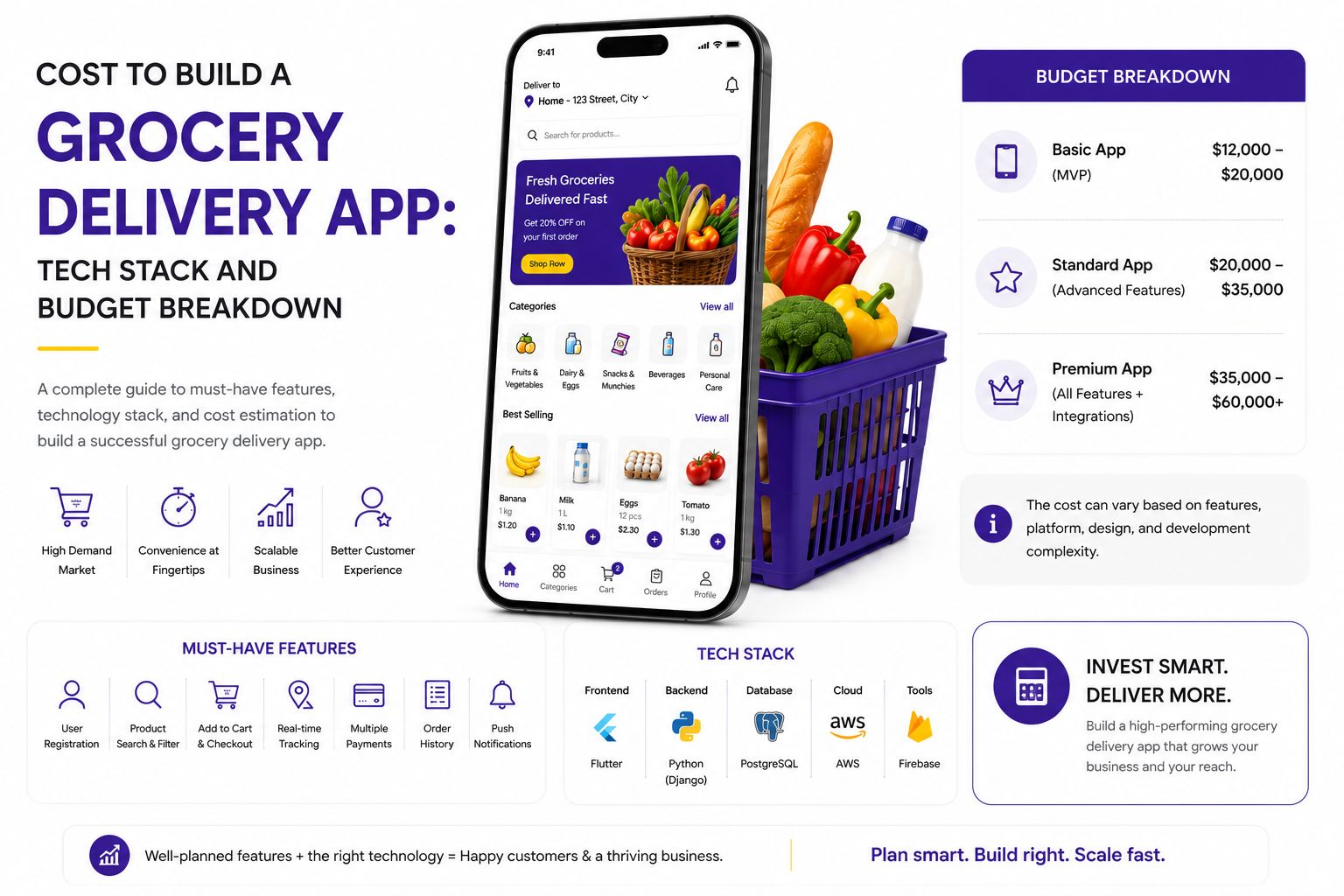

A founder we spoke with recently collected three proposals for what was, on paper, the exact same grocery delivery app idea. One developer quoted twelve thousand dollars. Another came back at fifty eight thousand. A third, after a long discovery call full of questions about dark stores and inventory syncing, landed at one hundred and ninety thousand dollars.
Same idea. Same market. Three numbers that do not seem to belong to the same project at all.
This is not unusual, and it is also not a scam. The honest answer is that a grocery delivery app is not one product. It can describe anything from a simple ordering form connected to a chat app, all the way to a multi sided platform that talks to store inventory systems, manages thousands of delivery partners across cities, and uses AI to suggest substitutes the moment an item goes out of stock.
If you are reading this because you are trying to figure out what your own project might actually cost, this guide is written for exactly that. Not for developers writing technical documentation, and not for students working on a case study, but for a CEO or founder who has thirty minutes, wants to understand where the money actually goes, and needs to walk into a vendor conversation already knowing the right questions to ask.
We will walk through the real cost to build a grocery delivery app in 2026, the technology choices that quietly change your bill by tens of thousands of dollars, and the costs that almost nobody mentions until you are three months into the project and the invoices start arriving.
What Building a Grocery Delivery App Actually Means in 2026
Before any cost conversation makes sense, it helps to be clear about what you are actually paying for. A grocery delivery platform in 2026 is rarely a single app. In most real projects, it is a connected set of products that work together.
There is the customer app, the part most people picture when they hear the words grocery delivery app. This is where shoppers browse products, build a cart, choose a delivery slot, and pay.
Then there is the delivery partner app, used by the people picking up and dropping off orders. It needs route guidance, order details, and a simple way to update status in real time.
There is also a store or vendor panel, used by the grocery stores or warehouses fulfilling orders, to manage stock, mark items unavailable, and confirm orders are ready for pickup.
And finally, there is an admin dashboard for your own team, used to track orders, manage delivery zones, handle refunds, and look at sales data across the whole operation.
When a quote sounds surprisingly low, it is often because it only covers the customer app, with the other three pieces either missing entirely or priced separately later in the project. One trend that has become close to standard by 2026 is dark store integration, where your app pulls live stock data from a dedicated fulfillment warehouse rather than a general retail store, and this single decision changes both the backend complexity and the overall budget significantly.
The Features That Actually Move the Needle on Cost
Two grocery apps can look almost identical on the surface and still cost twice as much to build, purely based on what happens behind the screen. Here is a breakdown of the features that most directly affect your budget, and why each one behaves the way it does.
Notice that the features which sound the most modern, things like AI substitutions or dark store syncing, are also the ones with the widest cost ranges. That is because they depend heavily on the data sources you already have. If your grocery partners already maintain digital inventory, integration is relatively straightforward. If they are still tracking stock on paper or in spreadsheets, that same feature can take significantly longer to build properly, because someone first needs to digitize and structure that data before any app can use it.
Tech Stack Breakdown: What Goes Into the Build
The tech stack you choose does not just affect how the app performs. It directly affects your budget, your timeline, and how easily you can hire developers later if you need to grow the team.
Here is what a typical 2026 grocery delivery app stack looks like, layer by layer.
The biggest early decision is usually frontend technology. Native apps built separately for iOS and Android using Swift and Kotlin still offer the smoothest possible performance, but for most grocery delivery apps, the performance difference does not justify paying for two separate codebases. By 2026, cross platform frameworks have matured enough that most successful grocery apps, including several regional players, run on Flutter or React Native without shoppers noticing any difference at all.
Cost to Build a Grocery Delivery App: Stage by Stage Breakdown
Now for the part most founders actually came here to see. Here is how the cost to build a grocery delivery app typically breaks down across each stage of development, based on projects that include a customer app, a rider app, a vendor panel, and an admin dashboard.
Add these ranges together and you will see why a complete platform rarely costs less than forty thousand dollars, even at the lower end, once every connected app is accounted for. The wide ranges within each stage usually come down to one thing, how many of these pieces are being built from scratch versus configured using existing tools and proven APIs.
Three Budget Scenarios: MVP, Mid Range, and Enterprise
Rather than giving you a single number that may not apply to your situation, it helps to think in terms of three realistic scenarios. Most grocery delivery projects fall clearly into one of these three buckets.
Here is the insight most blogs skip entirely. The jump from MVP to mid range is mostly about adding platforms and automation. The jump from mid range to enterprise is mostly about data. Enterprise grade grocery apps cost more not because the screens are more complicated, but because they need to process, store, and act on inventory and behavioral data in real time, and that requires a fundamentally different backend architecture, not simply more features bolted onto the same one.
Hidden Costs That Quietly Blow Up Budgets Later
This is the section most cost guides either skip entirely or mention in a single throwaway line. These are the costs that do not show up in your initial quote but absolutely show up in your bank statement six months after launch.
• Maps API usage. Google Maps and similar platforms charge per call. A small app might pay a few hundred dollars a month, but once you are tracking thousands of live deliveries, this can quietly become one of your largest recurring costs.
• Payment gateway compliance. Handling card payments often requires PCI DSS compliance, which can mean additional security audits and infrastructure work that is rarely included in the initial development quote.
• Inventory sync with store systems. If your grocery partners use their own point of sale or inventory software, connecting your app to it often requires custom integration work that depends entirely on what system they use, and that cannot be priced accurately until you actually know your partner stores.
• App store fees and review delays. Beyond standard developer account fees, delays in app store approval can push back your launch date, and a delayed launch has its own cost in lost time and momentum.
• Localization. If you plan to operate in more than one city or country, translating the app and adjusting for local currencies, tax rules, and delivery regulations adds cost that scales with every new region you enter.
• Customer support tooling. Live chat, helpdesk software, and support staff training are often budgeted separately from the app itself, but they are very much part of the real cost of running a grocery delivery service.
• Slot management and missed delivery handling. Features that manage delivery slot capacity and handle missed deliveries or returns are often added after launch, once real usage shows they are needed, which means a second round of development cost.
None of these are reasons to avoid building the app. They are simply reasons to ask your development partner one direct question before you sign anything, what exactly is included in this number, and what will I need to budget for separately.
What Happens After Launch: Maintenance and Scaling Costs
Most founders plan carefully for the cost to build a grocery delivery app and then significantly underestimate what it costs to keep it running afterward.
As a general guideline, annual maintenance and support typically runs between fifteen and twenty percent of your initial development cost. So if your app cost seventy thousand dollars to build, expect to spend somewhere around ten to fourteen thousand dollars a year on bug fixes, operating system updates, security patches, and small improvements.
But maintenance is only part of the picture. Server and cloud costs scale with usage, not with how the app was built. An app handling a thousand orders a month might run comfortably on fifty to one hundred dollars of cloud hosting. The same app handling fifty thousand orders a month could see that number climb into the thousands, simply because more orders mean more database reads, more notifications sent, and more location updates processed every minute.
There is also a less obvious cost worth planning for, technology aging. A tech stack that was a smart, cost effective choice in 2026 may need partial upgrades by 2028 or 2029, particularly around payment systems and mapping APIs, which get updated frequently for security and compliance reasons.
The practical takeaway is this. When comparing development quotes, also ask each vendor what their estimated monthly cloud cost would be at one thousand orders, ten thousand orders, and fifty thousand orders. The answers will tell you a lot about how the app has actually been architected, regardless of what the initial price tag says on its own.
Why the Location of Your Development Team Changes Everything
Where your development team is based affects your budget more than almost any other single factor, often more than the feature list itself.
The temptation is to assume the cheapest region automatically means the cheapest project, but that is not always true. A team with deep experience building grocery and on demand delivery platforms specifically will often work faster and avoid costly rework, even at a higher hourly rate, compared to a generalist team that is cheaper per hour but builds the wrong architecture the first time around.
When evaluating proposals, ask not just where the team is based, but how many grocery or on demand delivery projects they have actually shipped before. That single question often explains pricing differences better than location alone ever could.
How to Keep Costs Sane Without Building a Cheap App
There is a real difference between building an app cheaply and building it smartly, and the two often look similar on a budget sheet while leading to very different outcomes a year later.
Start with a phased roadmap instead of trying to launch everything at once. Launch with core ordering, checkout, and delivery tracking for one city or one set of stores, then use real customer behavior to decide which advanced features actually deserve investment. Many founders pay for AI recommendation engines before launch, only to discover that their actual bottleneck was delivery reliability, not personalization.
Choose cross platform development for your apps unless you have a specific reason not to. The performance gap between native and cross platform apps has narrowed enough that for most grocery use cases, it is not noticeable to end users, but the cost difference for your business is very noticeable indeed.
Use existing APIs and services wherever they already exist, rather than building custom systems from the ground up. Payment processing, maps, notifications, and even basic AI recommendations are all available as well tested third party services. Building these from scratch rarely makes sense unless your scale truly demands it.
Finally, structure your contract sensibly. For the core app, a fixed price agreement gives you budget certainty. For features that are likely to evolve based on user feedback, such as recommendation logic or loyalty programs, a time and materials arrangement gives you flexibility without forcing your development partner to guess at scope upfront.
Bringing It All Together
Going back to the founder and his three wildly different quotes from earlier. After working through what each proposal actually included, the picture became much clearer. The cheapest quote covered only a basic customer app, with no rider app, no vendor panel, and a single payment method. The most expensive quote included dark store integration and AI driven substitutions that, frankly, his business was not ready to use in its first year. The middle quote, once a few features were adjusted, ended up being the right fit.
That is really the point of this entire guide. The cost to build a grocery delivery app is not a fixed number waiting to be discovered somewhere online. It is a reflection of the choices you make about scope, technology, and timing, and the good news is that most of those choices are entirely within your control.
If you take one thing away from this, let it be a single question to ask every vendor you talk to going forward, walk me through exactly what is included in this number, and what typically gets added afterward. The answer to that one question will tell you more about your real budget than any rate card ever will.